Comparison · AI Assistants
ChatGPT dots vs Gemini Tasks (formerly Spark) vs Claude Cowork: which always-on AI agent is right for you?
Compare OpenAI's dots, Google's tasks in Gemini (formerly Spark) and Anthropic's Claude Cowork on plans, price, regions, scheduling, computer access and safety.

The short answer
All three do long-running work for you in the cloud. ChatGPT dots need Pro ($100 or more a month) or Business Premium and are built to keep working between conversations. Tasks in Gemini, which Google first called Spark, need Google AI Pro ($19.99) or Ultra and run jobs and schedules, but not in the EEA or UK. Claude Cowork is the cheapest way in, from Claude Pro at $20 a month, and is now part of every Claude conversation.
In the space of a few weeks, the three biggest AI assistants each shipped an agent that keeps working after you close the tab. OpenAI’s dots arrived on September 29, Google’s Gemini Spark, since renamed Task, is now open to AI Pro as well as Ultra, and Anthropic’s Claude Cowork became part of every Claude conversation on September 16. They overlap a lot, but the plans, regions and design choices differ. This comparison uses each vendor’s own help pages and launch posts, and it compares claims and documented limits. We haven’t tested them side by side.
The short answer
- Choose Claude Cowork if you want the lowest entry price and you already use Claude. It starts on the $20 Pro plan and needs no separate mode.
- Choose tasks in Gemini (formerly Spark) if you live in Google’s apps and want schedules that fire on an event such as an email arriving. It needs Google AI Pro at $19.99, and it’s unavailable in Europe and the UK.
- Choose ChatGPT dots if you want the most autonomous, proactive agent and can pay for Pro at $100 a month or up, or are on Business Premium. Expect a gradual rollout.
Side by side
| ChatGPT dots | Tasks in Gemini (formerly Spark) | Claude Cowork | |
|---|---|---|---|
| Maker | OpenAI | Anthropic | |
| Launched | September 29, 2026 | Earlier in 2026 (Ultra first); now Pro and Ultra | Merged into every conversation from September 16, 2026 |
| Plans | Pro and Business Premium; Enterprise beta | Google AI Pro or Ultra | Claude Pro, Max, Ultra, Team and Enterprise |
| Entry price (US) | $100 a month (Pro 100); first dot included | $19.99 a month (AI Pro) | $20 a month (Pro), $17 billed annually |
| Accounts | Personal and business, 18+ | Personal Google Account only, 18+ | Personal and organisation |
| Excluded regions | EEA, Switzerland, UK (Pro) | EEA, Nigeria, Switzerland, UK | None listed in the pages we read |
| Where you use it | ChatGPT desktop, web, mobile; Slack and Teams; texting beta | Gemini mobile app, Mac app, gemini.google.com | Claude web, desktop, mobile; Chrome side panel |
| Runs in | Its own cloud computer and browser | Remote browser and computer | Anthropic’s cloud (beta), with Claude Desktop for local files |
| Works between conversations | Yes, including proactive background research | Yes, via schedules | Yes, via scheduled and long-running tasks |
| Schedules | Reminders and recurring tasks | Time or condition based | Recurring tasks, in the cloud with no device online |
| Uses your own computer | Optional, off by default | Through Chrome auto browse | Files, browser and computer use while Claude Desktop is open |
| Concurrent limit | Not published | 15 tasks at once | Several tasks at once |
| Model | GPT-6 Astra | Gemini | Claude models, including Opus 5.5 and Sonnet 5.5 |
How each one works
ChatGPT dots
A dot is a named, persistent agent with its own cloud computer, browser and memory, reachable in ChatGPT, Slack and Teams. OpenAI says it can research in the background, learn from feedback and connect to more than 4,000 apps through plugins. It’s the most autonomous of the three: proactive research happens without you asking, though it uses read-only tools. The catch is access. Pro starts at $100 a month, and the rollout is gradual and excludes the EEA, Switzerland and the UK at launch. For the plans, see ChatGPT Pro explained.
Tasks in Gemini (formerly Spark)
Google’s help page says it renamed Spark to Task after testing it in beta since May; you now pick Task from the Chat and Task toggle next to the prompt box. Task turns the Gemini app into a task manager. You describe a goal, attach skills, connected apps and files, and set a schedule that can fire on a time or on a condition such as a new email. It can browse the web through Chrome auto browse and runs up to 15 tasks at a time. It’s the cheapest of the paid options at $19.99 a month on AI Pro, but it is limited to personal accounts, the Gemini mobile and Mac apps and the web app, and isn’t available in the EEA, Nigeria, Switzerland or the UK. Google says Gemini’s ability to handle tasks is experimental. See Google AI Plus vs Pro vs Ultra for what each plan includes.
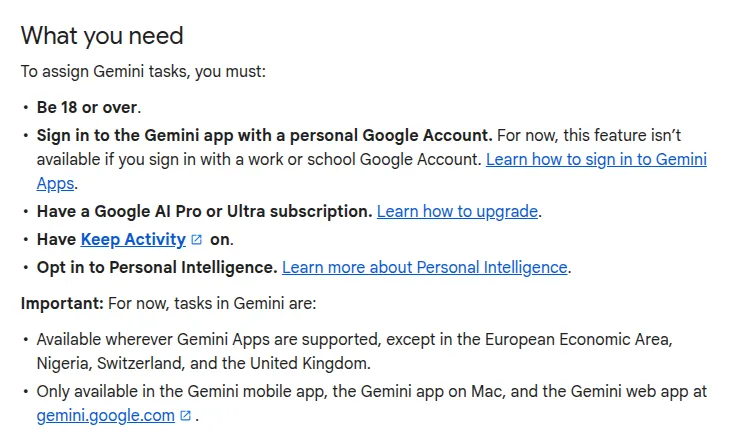
Screenshot: the What you need section of Google’s Gemini Apps Help page on tasks (the feature Google first called Spark): 18 or over, a personal Google Account, Google AI Pro or Ultra, and no availability in the EEA, Nigeria, Switzerland or the UK. Captured by Universal Digital Assistant on November 2, 2026.
Claude Cowork
Anthropic’s help pages say Cowork “brings Claude Code’s agentic capabilities to knowledge work beyond coding”. Since September 16 the rollout has been merging it into ordinary conversations on Pro, Max and Ultra, where Claude decides whether something is a quick answer or a longer task. More involved tasks keep running in the cloud if you close your laptop, scheduled tasks run with no device online, and tasks that need local files, the built-in browser or computer use need Claude Desktop open. Anthropic’s notes add that on October 6, 2026, new Cowork tasks on Pro and Max run in the cloud and the “Only on your computer” setting is removed. It is cheapest to start, at $20 a month. See also Claude Design, Slides and Docs.
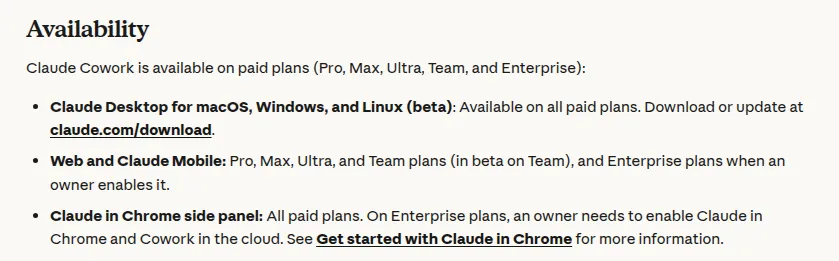
Screenshot: the Availability section of the Get started with Claude Cowork article in the Claude Help Center, listing the paid plans that include Cowork on desktop, web, mobile and the Chrome side panel. Captured by Universal Digital Assistant on November 2, 2026.
Safety and control
| ChatGPT dots | Tasks in Gemini (formerly Spark) | Claude Cowork | |
|---|---|---|---|
| Approval controls | Custom Rules (act, pre-approved, ask, hand off); auto-review | Asks you to take over in its browser; supervision advised | Asks before permanently deleting files; approval depends on mode |
| Sensitive actions | Changing a password always stays with you | Avoid scheduling sensitive tasks | Keep sensitive files out; use a dedicated folder |
| Stop or delete | Pause or Reset from the dot’s profile | Turn off task mode; delete remote browser and code data | Delete a task; removed from storage within 30 days |
| Vendor’s own warning | “Dots can still make mistakes” | “Gemini’s ability to handle tasks is experimental” | “Cowork has unique risks” from agentic use and internet access |
Which should you choose?
- Budget-conscious and already on Claude: Cowork. It is the only one of the three you can try on a $20 plan, and it lives in the chat you already use.
- Google Workspace-heavy, personal account, outside Europe: tasks in Gemini, particularly for event-driven schedules.
- Want an always-on assistant and have a Pro or Business Premium plan: dots, but check that your market is included and treat the first month’s extended limits as a trial period.
- In the EEA, Switzerland or the UK: Claude Cowork is the one whose pages we read that lists no regional exclusion. Check your own account.
Whichever you pick, start with low-stakes tasks such as summaries and research, review what the agent did, and keep sensitive data out until you trust it. For the wider category, see AI agents explained, and for the assistants themselves, the profiles for ChatGPT, Gemini and Claude.
Frequently asked questions
What is the main difference between dots, tasks in Gemini and Claude Cowork?
Dots are designed to stay on and work proactively between conversations, using their own cloud computer. Tasks in Gemini (formerly Spark) run the jobs and schedules you define inside the Gemini app. Cowork hands Claude a whole task in a normal conversation and keeps running it in the cloud. All three can work while you are away.
Which is the cheapest?
Claude Cowork, which is available on Claude Pro at $20 a month in the US ($17 billed annually). Tasks in Gemini need Google AI Pro at $19.99 a month or Ultra. ChatGPT dots need a Pro plan at $100, $200 or $500 a month, or Business Premium, although your first dot costs nothing extra.
Which works in Europe and the UK?
Tasks in Gemini are not available in the EEA, Switzerland, Nigeria or the UK. ChatGPT dots on Pro exclude the EEA, Switzerland and the UK at launch, while Business Premium is available in all supported regions. Claude Cowork's help pages don't list a regional exclusion.
Can they use my own computer?
Dots can, if you connect your computer through the ChatGPT desktop app, and access starts off. Claude Cowork can reach local files, the built-in browser and computer use while Claude Desktop is open. Tasks in Gemini work mainly through a remote browser and computer, plus Chrome auto browse.
Can they run on a schedule?
Yes. Dots run reminders and recurring tasks you set, Gemini task schedules can trigger on a time or a condition such as an email arriving, and Cowork scheduled tasks can run in the cloud with your computer off. Dots and Gemini tasks can also act in the background without a new message.
Which is safest for sensitive work?
None is risk free, and each vendor says it can make mistakes. Dots offer Custom Rules and auto-review, Gemini asks you to take over and warns against scheduling sensitive tasks, and Cowork asks before permanently deleting files and publishes safety guidance. Keep sensitive data out of all three until you have tested them.
Sources
Product facts are checked against the vendor's own announcements and documentation.
- Introducing dots — OpenAIhttps://openai.com/index/introducing-dots/
- Manage your tasks & workflows in Gemini Apps — Gemini Apps Helphttps://support.google.com/gemini/answer/17094507
- Get started with Claude Cowork — Claude Help Centerhttps://support.claude.com/en/articles/13345190-get-started-with-claude-cowork
- Claude Cowork and chat are one Claude — Claude Help Centerhttps://support.claude.com/en/articles/16761823-claude-cowork-and-chat-are-one-claude


